Aging report
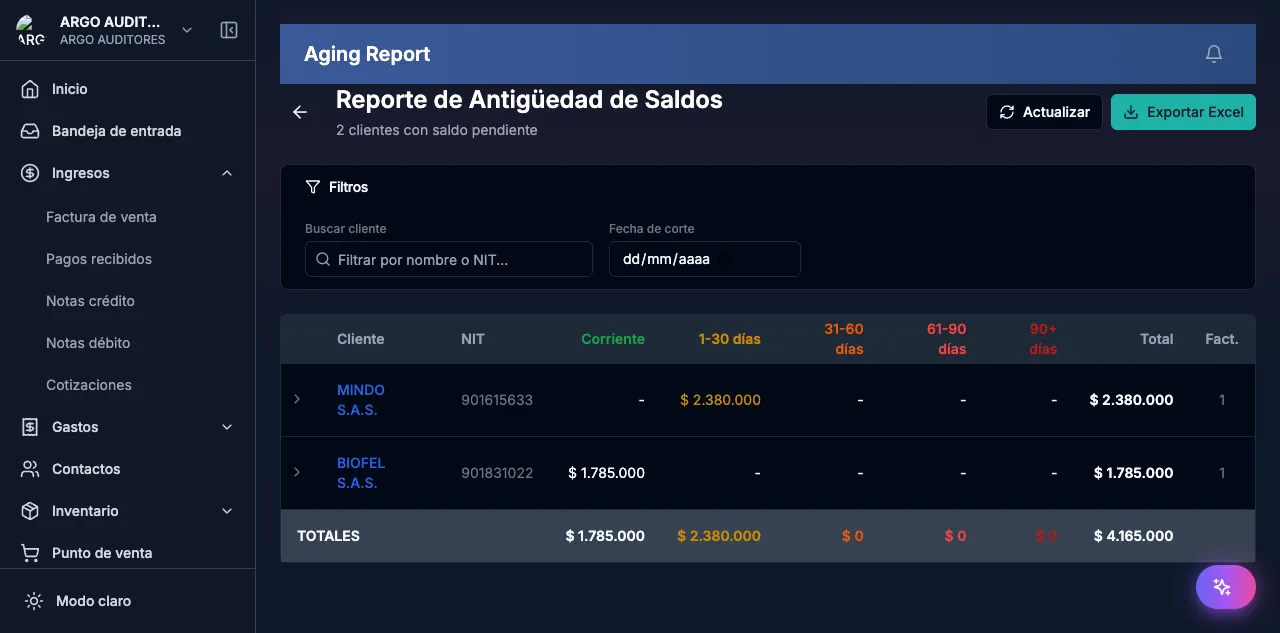
Analyze receivables and payables grouped by age. Filter by customer, supplier and due-date range.
Updated: April 5, 2026
The aging report shows outstanding invoices grouped by age. Lets you quickly identify which customers owe you and for how long, or which supplier invoices are approaching their due date.
Report types
| Type | Shows | Accounts |
|---|---|---|
| Receivables | Unpaid sales invoices | 1305 Customers |
| Payables | Unpaid purchase invoices | 2205 Suppliers |
Generate the report
Go to Reports → Aging report
Pick type (Receivables / Payables)
Set cutoff date
Days overdue = cutoff date − invoice due date.
Apply filters (optional)
Customer/supplier, age range.
Generate
Age buckets
| Bucket | Meaning |
|---|---|
| Current | Not yet due |
| 1-30 days | Less than a month overdue |
| 31-60 days | Between 1 and 2 months |
| 61-90 days | Between 2 and 3 months |
| 90+ days | More than 3 months |
Export
PDF (meetings) or Excel (detailed analysis). Includes summary by bucket and detail by invoice.
FAQ
Does it include provisional invoices?
No. Only confirmed invoices with outstanding balance.
How is outstanding balance calculated?
Invoice total minus recorded payments.
2026 enhancements
Per-installment edit
When an invoice has multiple installments, the aging report now lets you edit the amount and due date of each installment individually without regenerating the full invoice. Useful when renegotiating terms without issuing a new document.
Contact filter on multi-contact SI
When an Opening Balance (SI) invoice includes balances for several contacts in a single transaction (common in migrations), the report now filters correctly by contact, showing only the balance for the selected customer. Before, it showed the aggregate across all contacts in the SI, causing confusion during collections.